Make ground your own.
Deploy the crawler to establish a construction radius. Place refineries, barracks, workshops, and turrets around it. Keep ore routes and factory exits clear.
THE BASE IS MOBILE. THE MISSION IS YOURS.
An isolated convoy. A broken signal. One command crawler between your crew and silence.
Deploy your base, harvest alloy, build your force, and carry the mission across hostile ground. Real-time strategy, built for a 160 × 144 battlefield.
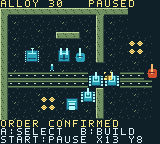
Your command crawler is your lifeline.
Keep it alive. Everything else is a decision.
A base is usually somewhere you return to.
Here, it’s something you bring along.
Deploy the crawler to establish a construction radius. Place refineries, barracks, workshops, and turrets around it. Keep ore routes and factory exits clear.
Automatic harvesters turn finite deposits into alloy. Reserve resources for a three-slot production queue, set factory rally points, or cancel the last unit for a full refund.
Pack the crawler and reposition your command. Production pauses while packed; deployed troops keep fighting. Mountains block shots, so terrain changes the plan.
80 seconds of authentic native-ROM gameplay.
Original pixels. Emulated stereo sound.
The showcase covers training, building placement, production feedback, tank combat, crawler escort, and the final defense. Chapter captions appear outside the game screen.
Three operations. Three different priorities.
The crawler must survive every one.
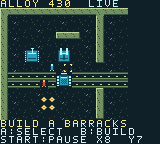 OPERATION 01
Break the hostile command and reconnect the convoy’s communications.
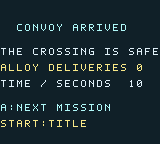 OPERATION 02
Your base becomes the cargo. Move the crawler through the crossing alive.
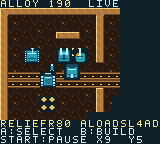 OPERATION 03
Hold against infantry waves while the harvesters work toward relief.
Victories unlock the next mission. Battery storage retains campaign unlocks. Mission timing follows simulation ticks; Last Stand’s target is 140 simulation seconds.
Press Select at the title to enter optional field training. Lessons pause the battle while you read, then advance as you complete the real actions.
Starting a new training run replaces a suspended battle after an introductory warning. Finish training and continue the same mission.
Select your command crawler and press A again to open commands. Deployment anchors your base.
X7 Y5 is a useful starting placement. Cyan outlines are valid; red crossed outlines indicate a blocked footprint.
Harvesters mine automatically once a refinery exists. Wait for a completed delivery, not just a mining trip.
Try X9 Y6. Keep the harvester’s path open and leave room for new troops to exit.
Reserve alloy for production. The HUD shows queued units and the leading job’s countdown.
Send a mobile combat unit to a destination. Use Squad Order when it’s time to move your entire combat force.
Play the official browser compilation.
Keyboard on desktop; on-screen controls on mobile.
Click inside the game to focus the controls.
At the title, use P for training and X to resume a suspended battle. Menus pause combat.
Open game in its own tabThe browser edition is a separate compilation from the downloadable v04 cartridge. Emulator save persistence depends on the browser and its storage settings.
Select a barracks or workshop and choose Set Factory Rally on command page 2. New infantry, buggies, and tanks move to that factory’s destination automatically.
Cancel Last Unit removes the tail of the production queue and returns its full alloy cost. Factory destruction also refunds that factory’s queued jobs.
Suspend Battle saves units, orders, resources, rally points, exploration, and the exact training lesson. Resume from the title into a paused battle when you’re ready.
Download the v04 Game Boy Color cartridge or the complete Field Training package, including the editable project and verification material. The verified v04 binaries, footage, and archive retain their original Project Crawler title; this website uses the finalized game name.
The downloadable .gbc file runs in a Game Boy Color emulator. The project targets ModRetro Chromatic; physical cartridge installation, hardware performance, boot, and save retention have not yet been verified.
This is a playable Field Training build. Crawler: Broken Signal is the game’s selected title; commercial name clearance remains outstanding. All three missions and six training lessons passed native-ROM controller playtests.
No. Crawler: Broken Signal is a single-player, three-mission real-time strategy campaign. Menus and lessons pause combat, and the battle can be paused with Start.
Campaign unlocks and suspended battles use battery SRAM. Suspend Battle saves the current operation; B at the title resumes it paused. Starting a new mission, confirming a restart, or reaching victory or defeat clears the suspended battle. Your emulator must retain battery saves.
The project’s recorded independent replay reproduced 192,914 native frames and 28 pixel checkpoints. Controller playtests covered campaign wins, training, building previews, rally orders, refunds, defeat and retry, and fresh-boot battery restoration. Physical hardware verification remains pending.
The complete project package contains the editable GB Studio project and its local Crawler engine extension. Open it in GB Studio 4.3.2 or the Chromatic plugin. Preserve the included upstream MIT license. The artwork and fiction are original; no C&C or StarCraft assets are used.